Keep your learning platform. We’ll fill it with accredited nursing CE.
Every MyERS learning activity is available as a SCORM file that loads into HealthStream, Workday Learning, Cornerstone and other learning management systems. New CE modules are ready to download from your MyERS Resource Center on the first business day of each month. Nurses learn and test with the login they already use, earn contact hours, and their completions appear alongside the rest of your training records.
Write your awesome label here.
✨ MyERS Resource Center
New accredited activities every month, packaged as SCORM 1.2 compliant files
👩💻 Your learning platform
HealthStream, Workday Learning, Cornerstone or similar
- Assign to nurses alongside your other courses
- Assessment scores and completions recorded
- Reports stay in one place
💖 Your nurses
Finish the activity, pass the assessment, earn one (1.0) CE contact hour.
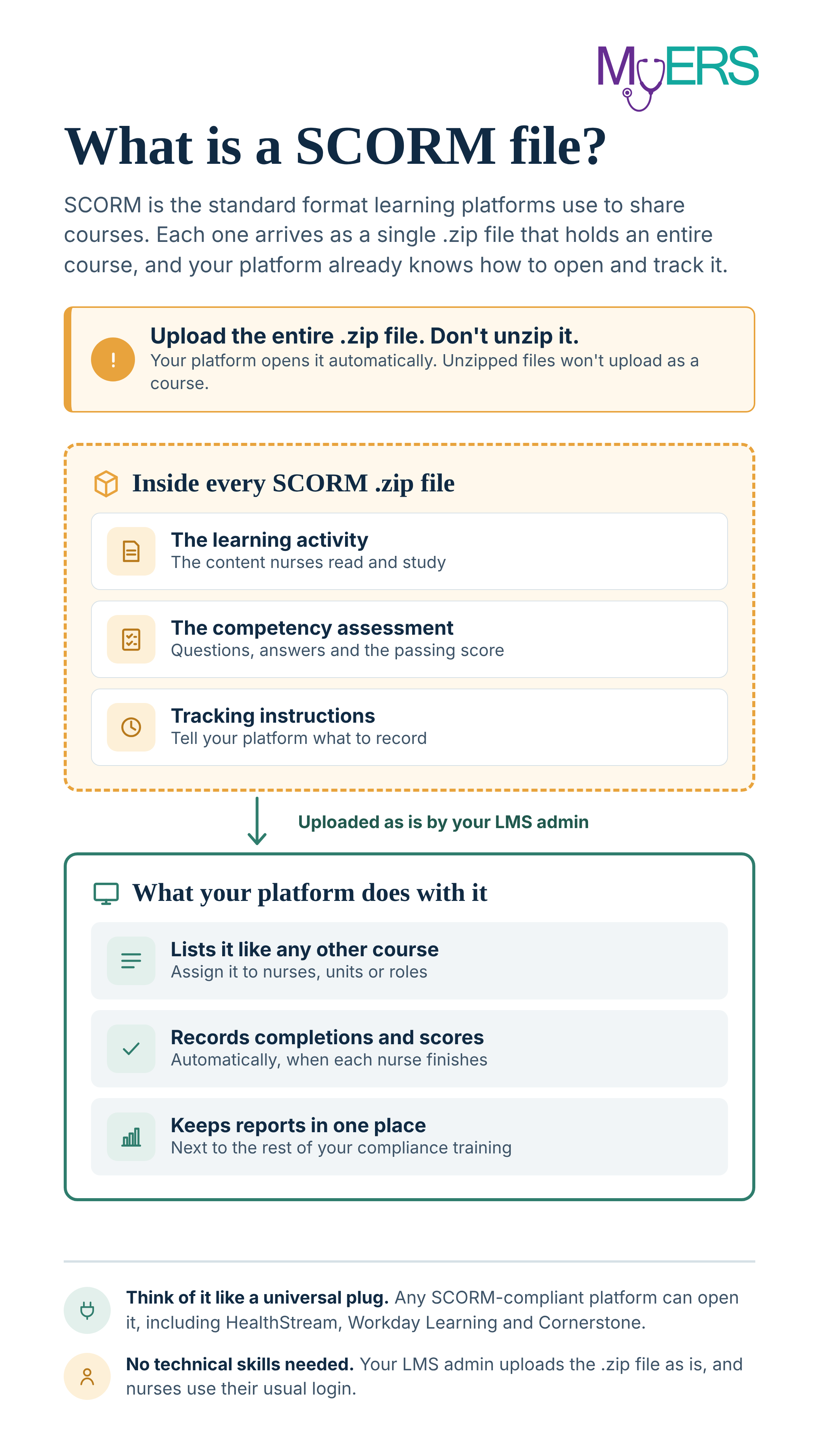
What is a SCORM file?
It's the standard way learning platforms share courses. You don't need any technical knowledge to use one.
What's in every package
The learning activity
~2,000 word, evidence-based activity written by master's-prepared nurse educators and peer reviewed.
Two behavioral objectives
Clear, measurable outcomes for every activity, ready for your education records.
Competency assessment
Ten multiple-choice questions. Nurses pass by answering 9 of 10 correctly.
Completion tracking
Pass or fail and the score are sent to your platform automatically when the nurse finishes.
Contact hours
Earn one (1.0) CE contact hour per successfully completed competency assessment, from a Florida Board of Nursing approved provider (#50-4366).
SCORM version
SCORM 1.2, the most widely supported version, accepted by most learning platforms. SCORM 2004 4th Edition compliant files available by request.
How SCORM delivery works
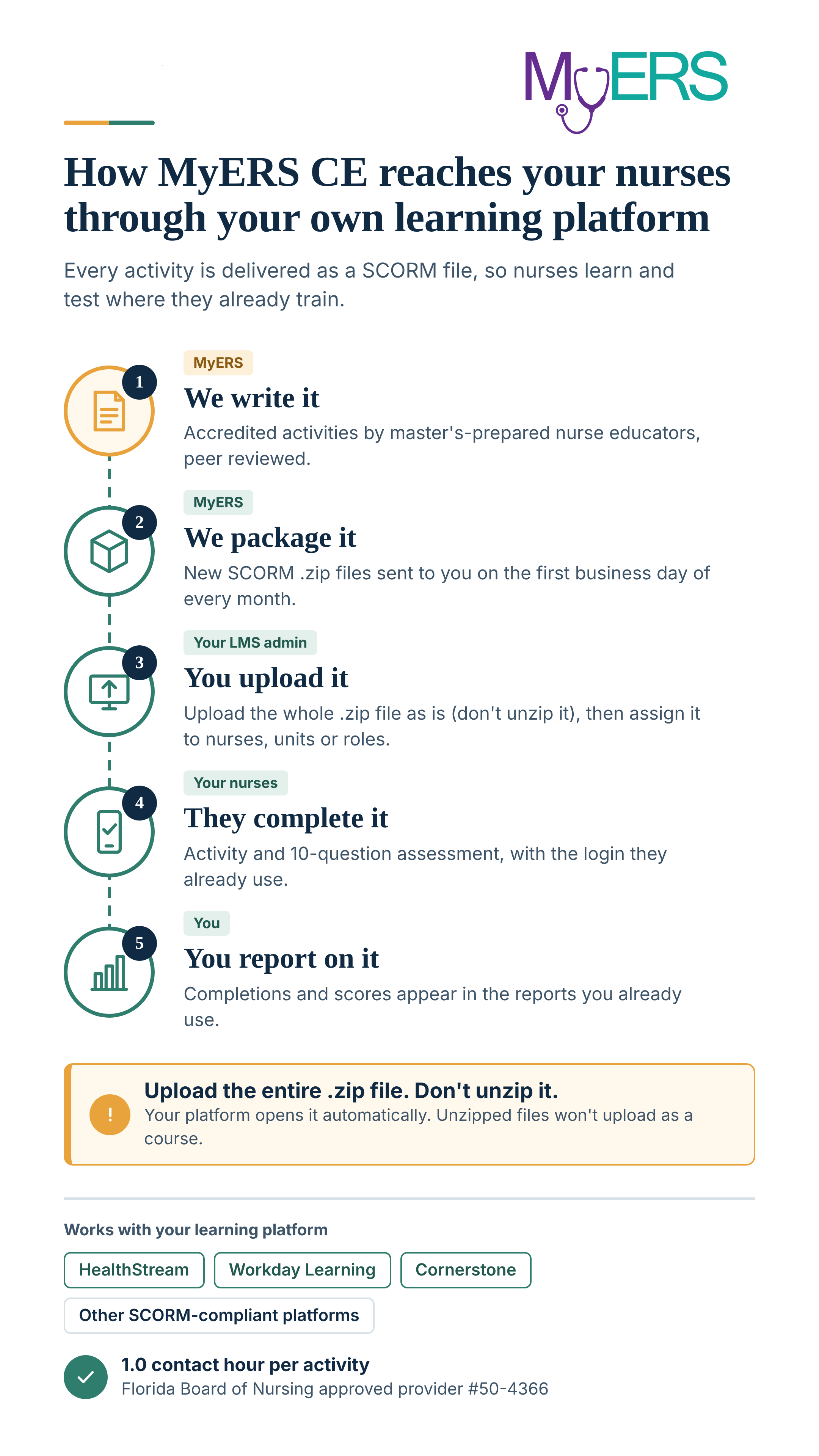
Five steps from our educators to your reports. Your part takes a few minutes a month.
How you'll receive files
New modules are released on the first business day of each month. Log in to your MyERS Resource Center administrator account to download that month's SCORM .zip files, ready to upload to your LMS.
How nurses get certificates
Your LMS records each completion when a nurse passes the assessment, keeping it with the rest of their training history. We provide a certificate template you can load into your platform or use as a guide to create your own.
Works with the platform you already use
MyERS packages are built to the SCORM standard, so they load into most learning management systems used by healthcare organization's.
Try a sample in your own platform
Download a real MyERS SCORM module and load it into your learning system. You'll see exactly how it looks, how the assessment works and how completions are tracked before you decide.
Write your awesome label here.
Perioperative Care for Patients with Autism Spectrum Disorder
How to test it
Download the .zip file. Don't unzip it.
↓
Upload the whole .zip to your platform as a new SCORM course. If your platform asks for a version, choose SCORM 1.2.
↓
Assign it to yourself and complete the activity and assessment.
↓
Check your reports to confirm the completion and score were recorded.
↓
Upload the whole .zip to your platform as a new SCORM course. If your platform asks for a version, choose SCORM 1.2.
↓
Assign it to yourself and complete the activity and assessment.
↓
Check your reports to confirm the completion and score were recorded.
Why education teams choose SCORM delivery
No second platform
Keep the system your organization has invested in. MyERS adds content, not software.
One login for nurses
Staff don't juggle another account, which keeps completion rates up.
One central set of records
Every completion sits in the same reports surveyors and leadership already review.
Specialized nursing content
Fill the gaps in your platform's library with monthly CE built by nurse educators for nursing teams.
Questions educators ask
Do our nurses need a MyERS account?
No. Nurses complete everything inside your learning platform with their usual login.
How do nurses get their contact hour certificates?
It depends on your learning platform. Each LMS handles completion records a little differently.
- In MyERS CompletE, a certificate of completion is generated automatically and archived in the nurse’s account for future reference.
- In your own LMS, the completion is recorded when a nurse passes the assessment. We’ll provide a template of our certificate that you can load directly into your platform, if it supports custom certificates, or use as a guide to create your own. Some platforms issue a digital badge instead.
Either way, what matters most is a reliable record of completion, and your LMS keeps it alongside the rest of your nurses’ training history.
Do we need to unzip the file first?
No. Upload the entire .zip file to your learning platform exactly as you received it. Your platform opens it automatically. If the files are unzipped first, the upload won't work.
Who uploads the packages?
Yes. Download our free sample activity, upload the .zip file to your platform, and complete it yourself to see exactly how it looks and tracks.
Are there per-user fees?
No. One flat-rate annual license covers all nursing staff at your facility, with no per-user fees and nothing charged to nurses. That’s true whether your nurses use MyERS CompletE or complete our activities in your own LMS through SCORM.
Any fees your LMS vendor charges for its own platform are separate. Licensing more than one facility? Ask about system-wide pricing.
Write your awesome label here.
View our list of upcoming learning activities!
Download our catalog showcasing our complete suite of continuing education and professional development programs for healthcare professionals, outlining the 2027 monthly learning activities across our eleven distinct programs. Each program features twelve monthly learning modules (six for bi-monthly programs) addressing current healthcare challenges, evidence-based practices, and emerging trends in their respective specialties. The learning activities are designed to enhance clinical excellence while meeting continuing education requirements.